
PowerToast is an application that allows users to automatically switch between user-defined Windows power schemes when plugging in or unplugging a laptop.
Unlike other solutions, PowerToast does not require the .NET framework and is fully customizable at any time.
Some (and by some I mean all of the noteworthy) thrilling features include:
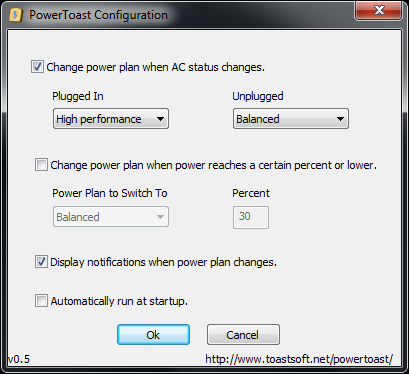
- Change Windows power plan based on "plugged in" status.
- Change Windows power plan when battery power reaches a user-defined level or lower.
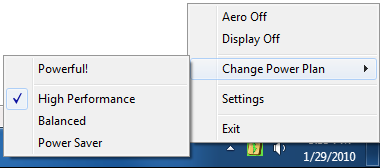
- Easily switch between power plans manually through the right-click context menu.
- Disable the Windows Vista/7 Aero visual style through the context menu.
- Turn off the monitor through the context menu. (I'm sure somebody wants to do this!)
Here are some screenshots!
|
Download:
Windows Vista/Windows 7: Download v0.5 (51kb)
If you think this program is awesome (or moderately alright), feel free to donate here:
|
| |